You have just finished cleaning a customer’s windows. Before leaving the neighborhood, consider the five nearby homes that fit your service area and allow flyer delivery. A message such as “We just cleaned windows on your street” gives those homeowners a concrete reason to notice your business.
That is a useful starting point for window cleaning flyers: connect a specific service with a nearby customer and make the response easy. A focused local introduction is easier to understand than a crowded page advertising every cleaning service you offer.
This guide covers the six elements to include, five copy examples, practical flyer sizes, distribution options, and a way to track cost per booked job. Start with a small campaign, record what happens, and improve the next batch using actual inquiries and bookings.
Choose the customer before choosing the design
A flyer for residential window cleaning needs different wording from one aimed at storefronts.
Homeowners want to understand which parts of the job are included: exterior glass, interior glass, screens, tracks, or other work. Storefront managers also need information about visit frequency, opening hours, access, and disruption to the business.
Choose one audience for your first campaign:
- Homeowners near a job you have just completed
- Residents in a neighborhood you can serve efficiently
- Storefronts along a compact commercial route
- Property managers responsible for nearby buildings
- Past customers due for a service reminder
Then choose the service you want to promote. A residential exterior-cleaning campaign does not need a list of every commercial service you provide.
Write down the audience, service, location, and response you want. For example: “Homeowners in [Neighborhood], exterior window cleaning, request a quote by phone.”
That short brief will guide the headline, photograph, wording, and distribution area.
The six elements every window cleaning flyer needs
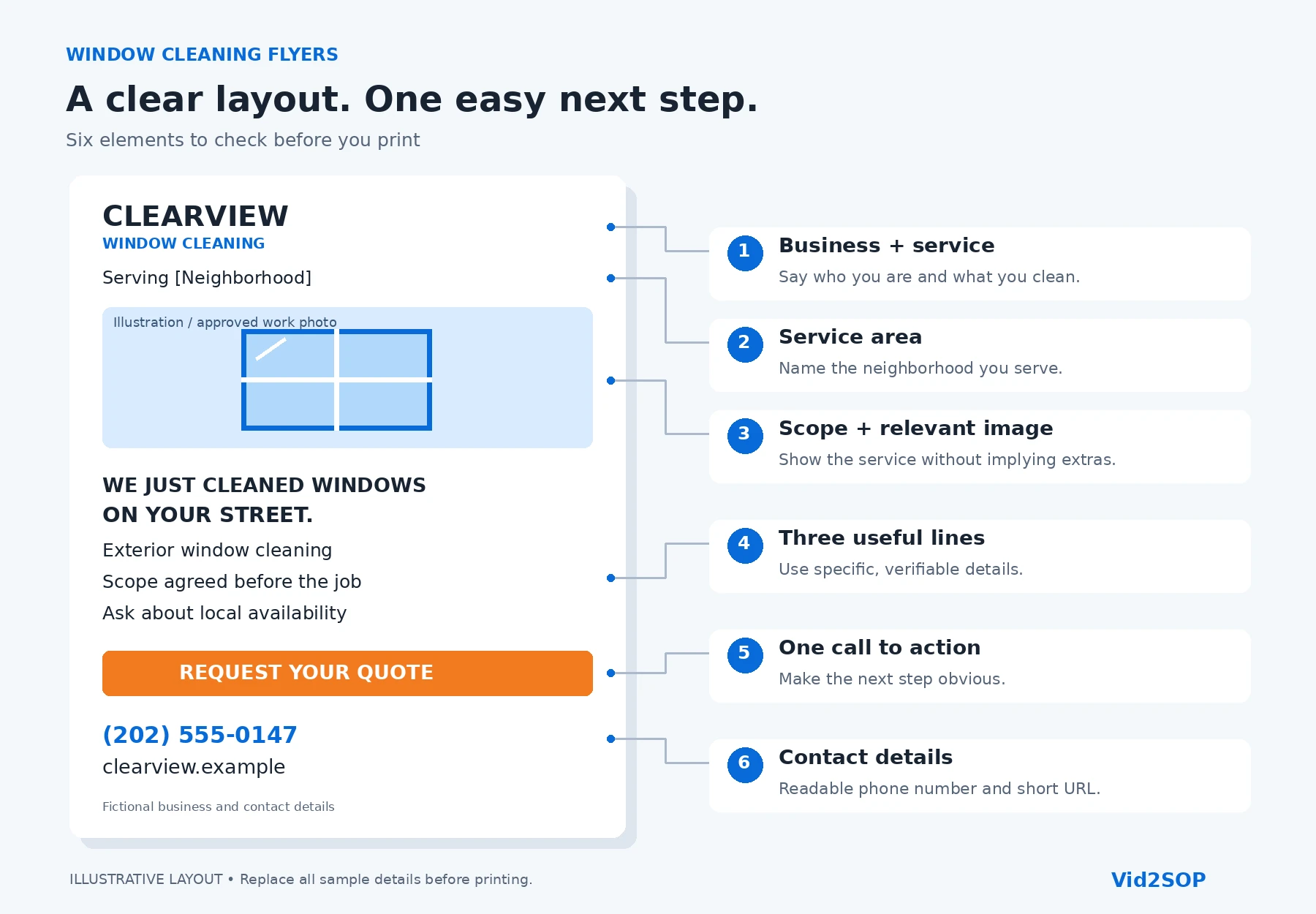
1. Your business name and main service
Make the business name visible and identify the service immediately.
“Residential Window Cleaning” or “Storefront Window Cleaning” tells readers what you do. A slogan can support that message, but it should not replace it.
Use the same business name customers will find on your website, business profile, and estimate.
2. Your service area
Name the city, neighborhood, or commercial area you actually serve.
A location helps readers decide whether the flyer is relevant. It also keeps your campaign focused on jobs you can schedule efficiently.
Check travel time and capacity before advertising a new area. More inquiries are useful only when you can serve them properly.
3. A clear description of the work
State what the advertised service includes or what customers can request.
For example:
“Exterior glass cleaning. Ask us about interior windows, screens, and tracks.”
Use a short description that matches your actual quote. Keep optional extras separate from the core service so customers do not assume everything is included.
4. Three useful benefit or service lines
Choose three factual points that help the reader understand your offer. Examples include:
- Residential window cleaning in [Neighborhood]
- Scope agreed before the job
- One-time and recurring visits available
These lines should answer customer questions. Avoid filling the space with unsupported claims such as “the best,” “lowest price,” or “perfect results every time.”
5. One main call to action
Tell readers exactly what to do:
- “Request your window cleaning quote.”
- “Ask us about availability on your street.”
- “Contact us about recurring storefront cleaning.”
Choose one primary response method. A flyer with several competing instructions makes the next step harder to identify.
6. Readable contact details
Include a phone number, short website address, or another contact method you regularly monitor.
A QR code provides an additional path to a quote page. Keep a readable alternative for people who prefer to call or cannot scan it.
Check every digit and test every link before printing.
Five window cleaning flyer copy examples
Replace all bracketed fields before using these examples. Confirm every claim, including free quotes, response times, opening-hour visits, recurring schedules, and seasonal availability. Change any promise your business cannot consistently fulfill.
Example 1: Neighbors of a finished job
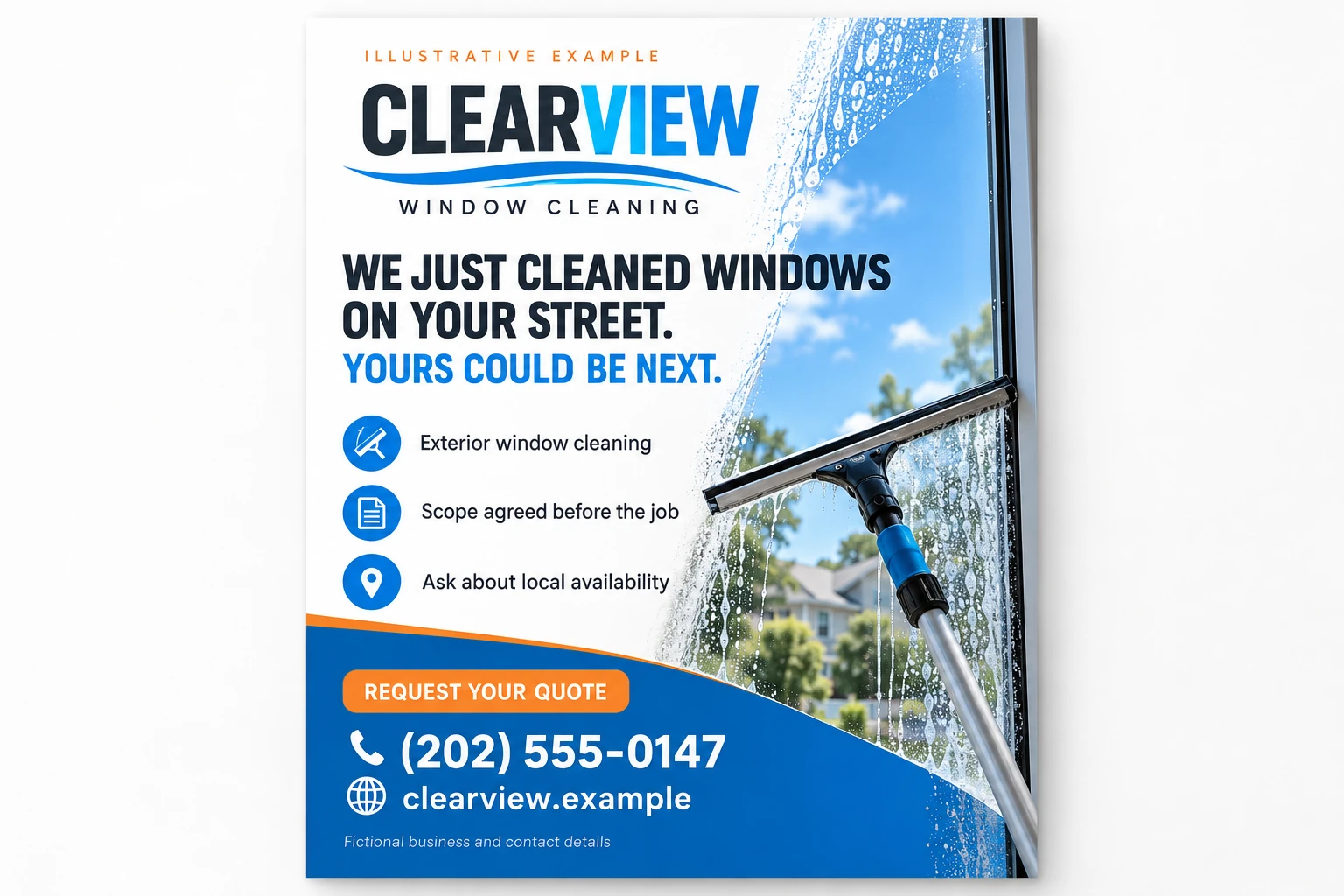
WE JUST CLEANED WINDOWS AT [STREET]. YOURS COULD BE NEXT.
We provide residential window cleaning in [Neighborhood].
Ask us about [your actual services] and availability for your home. We will confirm the scope and quote before you book.
Request your quote: [phone or short URL]
Use this message after a completed job on the named street. Do not include a customer’s name, house number, photograph, or endorsement without permission.
Example 2: Residential cleaning
CLEAR WINDOWS IN [NEIGHBORHOOD]. FREE QUOTE WITHIN [TIME FRAME].
We clean [exterior windows / interior and exterior windows] for homes in [service area].
Tell us what you need cleaned. We will explain the included work, any extras, and available appointment times.
Get your free quote: [phone or short URL]
A specific response time gives the reader a clear expectation. Select a timeframe your team can meet, including busy periods.
Example 3: Storefront cleaning
STOREFRONT GLASS CLEANED BEFORE YOU OPEN.
Weekly, biweekly, or monthly visits.
We provide scheduled storefront window cleaning in [commercial area].
Contact us to discuss your glass, access, opening hours, and preferred visit frequency.
Ask us about a service plan: [phone or short URL]
This example suits a business that offers those schedules and can coordinate visits before opening. Adjust the headline if your actual service hours differ.
Example 4: Seasonal cleaning
SPRING WINDOW CLEANING IN [CITY]. BOOKING NOW FOR [MONTH].
We are scheduling [your actual services] for homes in [service area].
Contact us to confirm the work you need and available dates.
Request a quote and appointment options: [phone or short URL]
Match the season and month to the campaign’s actual timing. Remove old copies when the advertised booking period ends.
Example 5: Past customers
IT’S BEEN [NUMBER] MONTHS. READY FOR YOUR NEXT CLEAN?
We would be happy to help with your next window cleaning visit.
Tell us whether you need the same work as last time or a different service. We will confirm the current scope, quote, and schedule.
Arrange your next visit: [phone or short URL]
Use this as a customer-specific reminder based on the actual service history. Respect contact preferences and stop reminders when a customer asks.
Reach the neighbors of a finished job
After a completed job, identify the nearest five to ten homes where your service fits and flyer delivery is permitted.
This approach ties the message to work you genuinely performed nearby. It also gives you a manageable distribution routine instead of a separate afternoon spent covering a large area.
Use a simple process:
- Complete the customer’s job and final checks.
- Confirm that nearby flyer delivery is permitted.
- Select five to ten suitable homes.
- Deliver the local version of your flyer.
- Record the street or area, date, and quantity.
- Track inquiries using the campaign name or code.
Keep customer information private. Naming a street is enough; there is no need to identify which homeowner hired you.
Nearby bookings can reduce travel between jobs when the appointments fit the same route. That advantage depends on access, scheduling, and job requirements, so record the actual travel time rather than assuming every nearby booking costs less to serve.
Carry a small supply of current flyers in the vehicle. Assign responsibility for checking that contact details and offers are still accurate.
Choose a flyer size and format
Select the format for the delivery method, reading distance, and amount of information.
| Format | Typical size | When to use it | Suggested first test |
|---|---|---|---|
| Full-page flyer | 8.5 × 11 inches | Permission-based bulletin boards, business displays, or a message needing more space | 25–50 copies for selected locations |
| Half-page flyer | 5.5 × 8.5 inches | Neighborhood hand delivery and leave-behinds | 50–100 copies across a defined area |
| Postcard | For example, 4 × 6 inches; confirm postal specifications | Addressed mail with a compact message | 50–100 addressed pieces |
| EDDM mailpiece | Confirm an eligible flat-size format with USPS or your printer | Postal delivery to selected carrier routes | Plan around route counts and current program requirements |
These quantities are planning suggestions, not a proven response formula.
For the neighbor approach, a 50-copy batch supports five to ten small drops. Keep the design consistent during that test so you can interpret the response.
A standard postcard is not automatically eligible for Every Door Direct Mail. Confirm the service, dimensions, paper specifications, mailing preparation, and quantity requirements before ordering.
Build a layout readers can scan
Give the flyer a clear reading order:
Headline → image → three benefit lines → call to action → contact details
The headline identifies the service or local reason to respond. The image supports the message. The benefit lines explain the offer, and the final section tells the reader what to do.
Keep the page focused. A large logo, several photographs, long paragraphs, and multiple promotions compete for the same limited attention.
Use contrast between the text and background. Give the phone number and response instructions enough space to remain readable in the printed proof.
Use your own permission-cleared work photographs or appropriately licensed imagery. A before-and-after example should show the same actual job under reasonably comparable conditions. Generated imagery can illustrate a layout, but it should not be presented as a customer result.
Should you put a price on the flyer?
Include a price when the reader can understand exactly what it covers and your business can honor it.
If the quote depends on window count, access, condition, interior work, screens, or other details, use a quote request and explain the information you need.
Before publishing a price, answer:
- Which work is included?
- Which properties qualify?
- Are there minimum charges?
- Which services cost extra?
- What happens if access or condition changes the scope?
- Does the offer have an expiration date?
A “starting from” price still needs context. State the qualifying scope close to the price rather than hiding important conditions in tiny text.
For a discount, check the remaining margin after labor, supplies, travel, and campaign expenses. A clear introduction does not require a promotion.
Check the print file before ordering
Ask your printer for the finished size, bleed, safe area, and preferred export specifications.
Keep important details clear of trim edges. Use images suitable for the print dimensions, and export the approved file rather than printing a screenshot.
Print one proof and review it in normal light:
- Read the headline and contact details at a comfortable distance.
- Check the phone number digit by digit.
- Open the website on a phone.
- Scan the QR code from the paper proof.
- Confirm that the destination matches the offer.
- Check colors, image quality, and both sides.
- Verify the promotion dates and conditions.
Ask someone who did not design it to explain the offer and next step. If they misunderstand either, simplify the wording before ordering.
Five distribution options
Hand delivery to doors
Use permitted delivery points in a defined neighborhood. Keep flyers secure without damaging property, blocking access, or leaving loose paper that can blow away.
Leave-behinds after a job
With the customer’s agreement, leave a service reminder or a small number of referral copies. Make them useful and avoid pressuring the customer to distribute them.
Community boards and local businesses
Ask the owner or manager before displaying a flyer. Choose locations relevant to your service area and check when materials must be removed.
Storefront walk-ins
Visit at a suitable time, introduce your service briefly, and ask whether you can leave information for the decision-maker. Respect staff time and accept a refusal immediately.
Postal mail
Addressed mail lets you contact selected recipients through the postal system. In the United States, USPS Every Door Direct Mail provides a separate option for reaching selected carrier routes; check its current preparation, format, quantity, and postage requirements.
Check distribution rules before the first drop
In the United States, do not put advertising flyers in or on USPS mailboxes yourself. Use the postal system for mailed advertising and follow USPS mailbox restrictions.
For door delivery, check the city’s handbill, solicitation, and permit requirements. Respect “No Soliciting” signs, HOA restrictions, gated-community access rules, and property-manager instructions.
Permission at one property does not establish permission throughout a neighborhood. Do not enter restricted areas or leave flyers where they become litter.
Record any distribution restrictions alongside your campaign area so your team follows the same instructions.
Connect the flyer with your online content
A homeowner who sees your flyer can look up the business before contacting you. Make the information consistent across your website, business profiles, and social pages.
Use the same name, service area, contact details, and service description. During the campaign, publish a service introduction, a quote-information post, a permission-cleared work photo, and an answer to a common question.
For this supporting social content, the Window Cleaning Canva Templates & Marketing Kit on Etsy includes editable social media designs and captions. It supports the online side of the campaign; this article does not describe it as a collection of flyer templates.
Disclosure: Vid2SOP and Local Growth Studio are related brands. The linked digital product is from our Etsy shop.
See our window cleaning social media post ideas for additional prompts. Adapt the content to the service promoted on the flyer so readers find the same offer wherever they check.
Track inquiries and booked work
Create one record for each campaign or batch. Include:
- Batch name, delivery date, and area
- Number of flyers actually distributed
- Printing and distribution costs
- Inquiries received
- Quotes provided
- Jobs booked and completed
- Revenue and costs of delivering those jobs
Ask customers where they found you. A campaign code or dedicated landing page helps identify responses, but keep the source question for callers who do not use it.
Use these calculations:
Campaign cost = printing cost + distribution cost + other campaign expenses
Cost per inquiry = campaign cost ÷ inquiries
Cost per booked job = campaign cost ÷ jobs booked
If the inquiry or booking count is zero, leave the corresponding calculation unavailable. Do not treat zero results as a zero acquisition cost.
Worked example
Suppose a campaign costs $120 in total, generates six inquiries, and produces two booked jobs.
- Cost per inquiry: $120 ÷ 6 = $20
- Cost per booked job: $120 ÷ 2 = $60
These figures illustrate the calculation; they are not expected campaign results.
Compare acquisition cost with the contribution remaining after service labor, supplies, travel, and other job costs. Also distinguish booked work from completed, paid work.
Track recurring customers over an appropriate period using actual retention and service costs. Do not assume every first booking becomes a long-term account.
Review the test before printing more
Ask:
- Were inquiries inside the service area?
- Did readers understand the advertised scope?
- Did the phone number, URL, and QR code work?
- Did the team respond promptly?
- Did booked jobs fit the route?
- Did completed work leave enough margin after campaign costs?
Fix repeated misunderstandings in the copy. Reconsider areas that create difficult travel or access. If inquiries do not become bookings, review the quote and follow-up process before increasing distribution.
Change one major variable at a time—such as the headline or area—and give each batch a separate identifier.
Frequently asked questions
What size should a window cleaning flyer be?
A half-page flyer, 5.5 × 8.5 inches, is a practical starting format for hand delivery. A full page gives more space for displays. For postal mail, confirm the format and service requirements before printing.
Where can I legally distribute flyers?
The answer depends on local rules and property permission. Check city requirements, signs, HOA rules, and building access restrictions. In the United States, do not place advertising in or on USPS mailboxes yourself.
How many flyers should I print for a first test?
For a small hand-delivery test, plan around 50–100 copies in a clearly defined area. The neighbor approach uses five to ten copies per completed job. Postal campaigns have their own quantity requirements.
Should I offer a discount?
Only if the terms are clear and the service remains worthwhile after costs. A direct quote request is also a valid offer.
How do I know whether the campaign worked?
Track distribution, expenses, inquiries, quotes, and completed jobs. Compare acquisition cost with the contribution from the work, and review route fit as well as response volume.
Make the service match the flyer’s promise
A flyer introduces a standard of work. Every new customer it brings should receive a consistent inspection, agreed scope, careful cleaning, and final check, whoever performs the job. A streak-free finish can be your working standard without becoming an unconditional promise about every surface or condition.
Document one well-run job with Vid2SOP. With permission to record the property, film the preparation, cleaning sequence, and final inspection. Avoid capturing customer details or unrelated people.
Upload the video to Vid2SOP, which captures images into an editable visual draft. Write and review the instructions yourself: what to prepare, how to confirm the scope, what to check, and when a technician should stop and ask for guidance. The current version does not transcribe speech or automatically write the procedure.
Review the finished guide with an experienced team member, then use it during training. Update it when equipment or methods change, and verify performance on actual jobs. A document supports training; it does not replace supervision or appropriate safety instruction.
Keep marketing and operations connected: advertise the service you can deliver, track the customers it brings, and document your team’s process with Vid2SOP.
Put your process into practice
Advertise the service you can deliver, track the customers it brings, and document your team's process with Vid2SOP.
Create your SOP