
SEE WHAT YOU WILL DOWNLOAD
A look inside the file.
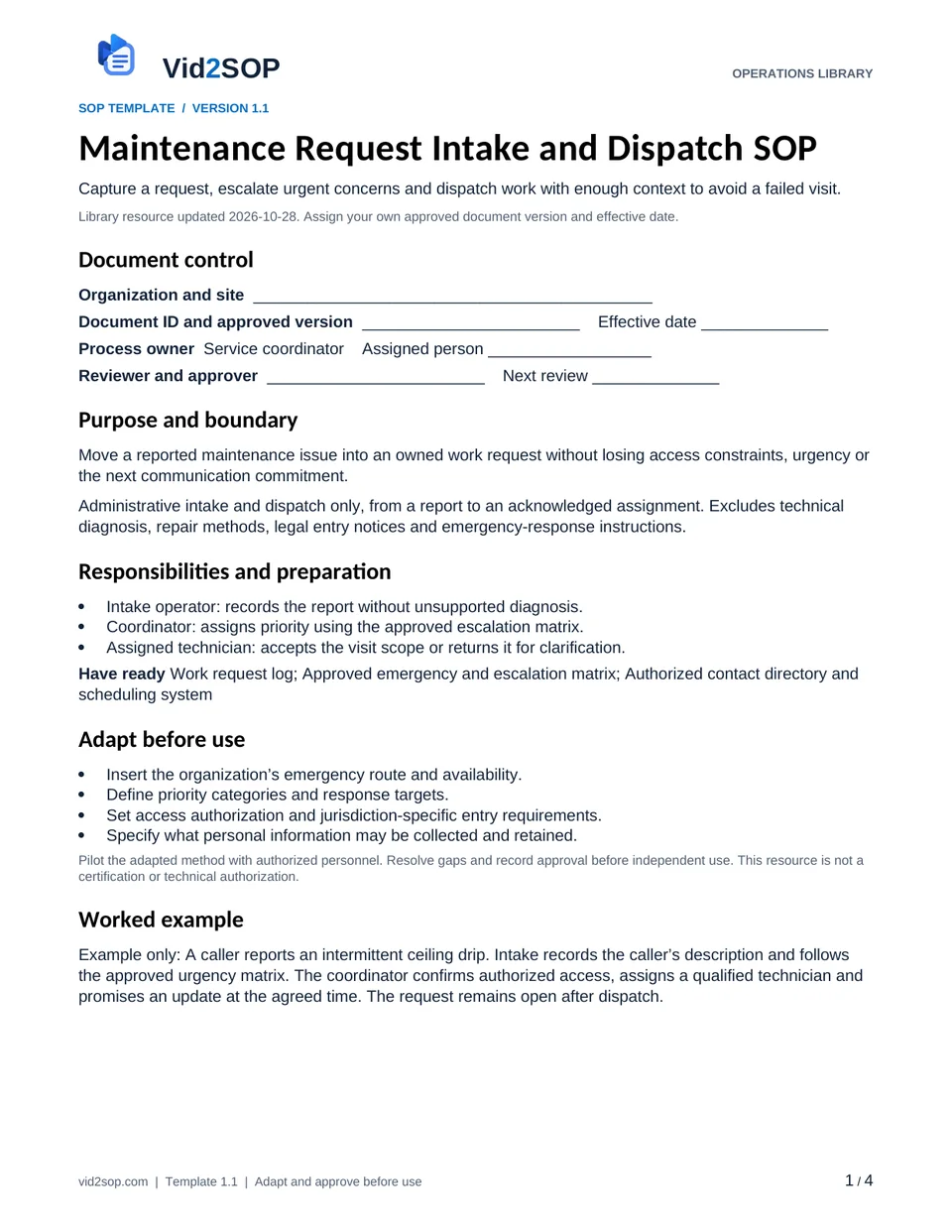
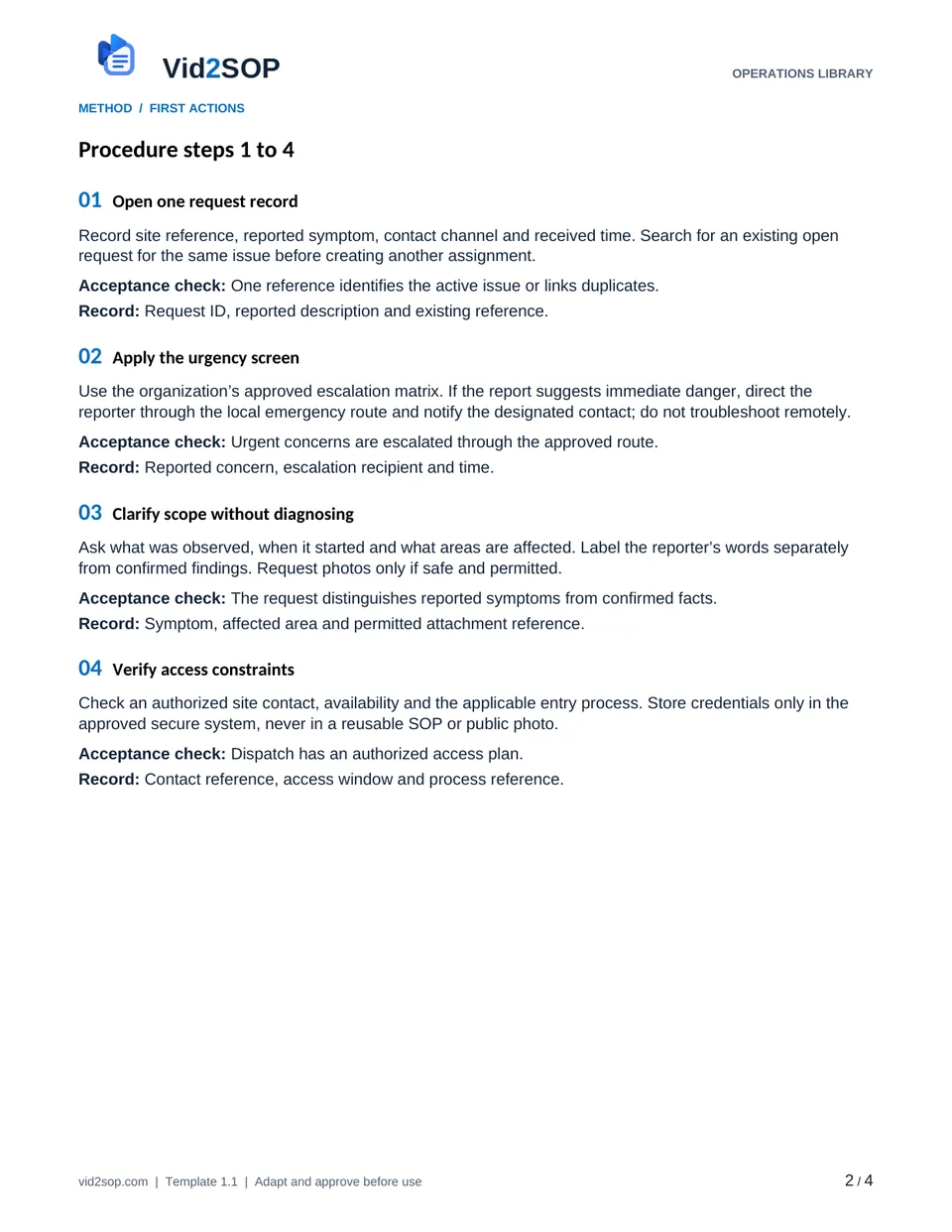
These previews show the actual template pages: document control and scope, followed by the detailed procedure. Download the Word file to adapt the content, or the PDF for a printable reference.
4 pages · Version 1.1 · Organization approval required
Select a page to open a larger preview.
Ready to adapt it for your team?
Editable Word or printable PDF. No email required.
Purpose and scope
Move a reported maintenance issue into an owned work request without losing access constraints, urgency or the next communication commitment.
Administrative intake and dispatch only, from a report to an acknowledged assignment. Excludes technical diagnosis, repair methods, legal entry notices and emergency-response instructions.
Service coordinator. Assign the actual owner, reviewer, approver and effective date before use. The library update date is not your approval date.
Who does what
- Intake operator: records the report without unsupported diagnosis.
- Coordinator: assigns priority using the approved escalation matrix.
- Assigned technician: accepts the visit scope or returns it for clarification.
Tools and records
- Work request log
- Approved emergency and escalation matrix
- Authorized contact directory and scheduling system
Customize before the first use
- Insert the organization’s emergency route and availability.
- Define priority categories and response targets.
- Set access authorization and jurisdiction-specific entry requirements.
- Specify what personal information may be collected and retained.
Use the Word file to edit the method, roles and fields. PDF is a printable reference, not an interactive form. Pilot the procedure with an authorized team member and resolve gaps before approving it.
The procedure
- 01
Open one request record
Record site reference, reported symptom, contact channel and received time. Search for an existing open request for the same issue before creating another assignment.
Acceptance check One reference identifies the active issue or links duplicates.
Record Request ID, reported description and existing reference.
- 02
Apply the urgency screen
Use the organization’s approved escalation matrix. If the report suggests immediate danger, direct the reporter through the local emergency route and notify the designated contact; do not troubleshoot remotely.
Acceptance check Urgent concerns are escalated through the approved route.
Record Reported concern, escalation recipient and time.
- 03
Clarify scope without diagnosing
Ask what was observed, when it started and what areas are affected. Label the reporter’s words separately from confirmed findings. Request photos only if safe and permitted.
Acceptance check The request distinguishes reported symptoms from confirmed facts.
Record Symptom, affected area and permitted attachment reference.
- 04
Verify access constraints
Check an authorized site contact, availability and the applicable entry process. Store credentials only in the approved secure system, never in a reusable SOP or public photo.
Acceptance check Dispatch has an authorized access plan.
Record Contact reference, access window and process reference.
- 05
Assign owner and visit window
Choose a technician or approved contractor within their authorized scope. Include symptoms, priority, access constraints and any relevant record of previous visits.
Acceptance check Assignee has enough information to accept or reject the scope.
Record Assignee, priority, visit window and scope.
- 06
Obtain dispatch acknowledgment
Ask the assignee to accept the request. If there is no acknowledgment within the internal target, use the backup dispatch route rather than treating a sent message as acceptance.
Acceptance check A named assignee has accepted responsibility.
Record Acknowledgment time or escalation trail.
- 07
Confirm the next update
Tell the requester the visit window or the next update time. Keep the issue open until the separate completion process has verified the outcome.
Acceptance check Requester has an accurate next step and the job is not closed early.
Record Message time, promised update and current status.
When the standard route does not fit
Duplicate reports arrive
Link them to the active request while preserving each relevant contact update.
No authorized access can be arranged
Keep the job blocked, assign an access owner and communicate a new update time.
The requested work exceeds the assignee’s authorization
Return it to the coordinator for a qualified assignment; do not broaden the SOP into a repair instruction.
Release checks
- Priority comes from the approved matrix, not a guessed diagnosis.
- No assigned job lacks acknowledgment or an escalation owner.
- Dispatch status is separate from technical completion.
Record the outcome, unresolved actions, responsible owner and review date. Keep records in your approved system and apply your organization’s retention rules.
ILLUSTRATIVE SCENARIO
What a useful record looks like
Example only: A caller reports an intermittent ceiling drip. Intake records the caller’s description and follows the approved urgency matrix. The coordinator confirms authorized access, assigns a qualified technician and promises an update at the agreed time. The request remains open after dispatch.
Record your actual method
- Record a dummy request from intake through acknowledgment.
- Explain which fields are reported facts and which are confirmed.
- Use fictional site and contact details; hide credentials and personal data.
Obtain permission before recording. Remove customer information, access codes and personal details. Follow the current upload limits and access conditions shown in Vid2SOP. Review any resulting draft against what the video actually demonstrates.
Prepare a recording brief
Use the recording prompts above to plan your demonstration. With JavaScript enabled, you can also prepare a brief here.
Questions before you download
Can I edit this template?
Yes. The DOCX file can be edited in Word or imported into a compatible document editor. Check layout after editing. There is no direct template import into Vid2SOP in this release.
Is it approved for my country or industry?
No. It is a general operational drafting resource for adaptation. A responsible person must check local requirements, site conditions and the organization’s approved methods. No OSHA, COSHH, ISO or other certification is claimed.
Can my team use it commercially?
You may adapt and use it for your own organization’s internal operations, including paid service delivery. Do not resell or redistribute the unmodified library files as a competing template product.
Background references
These references provide context; they do not endorse or approve this template.
Put the procedure to work.
Download, adapt, pilot and approve the version your team will use.