
SEE WHAT YOU WILL DOWNLOAD
A look inside the file.
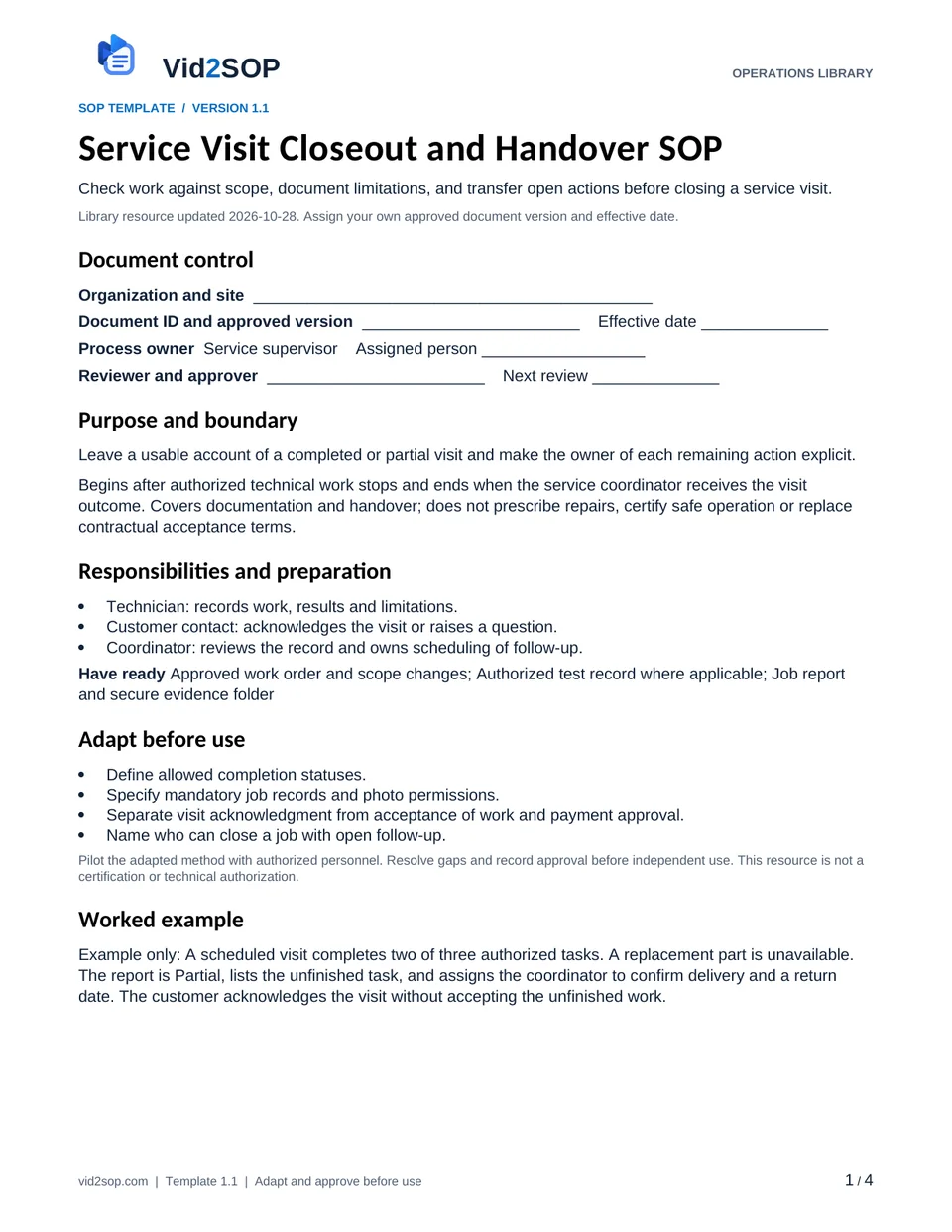
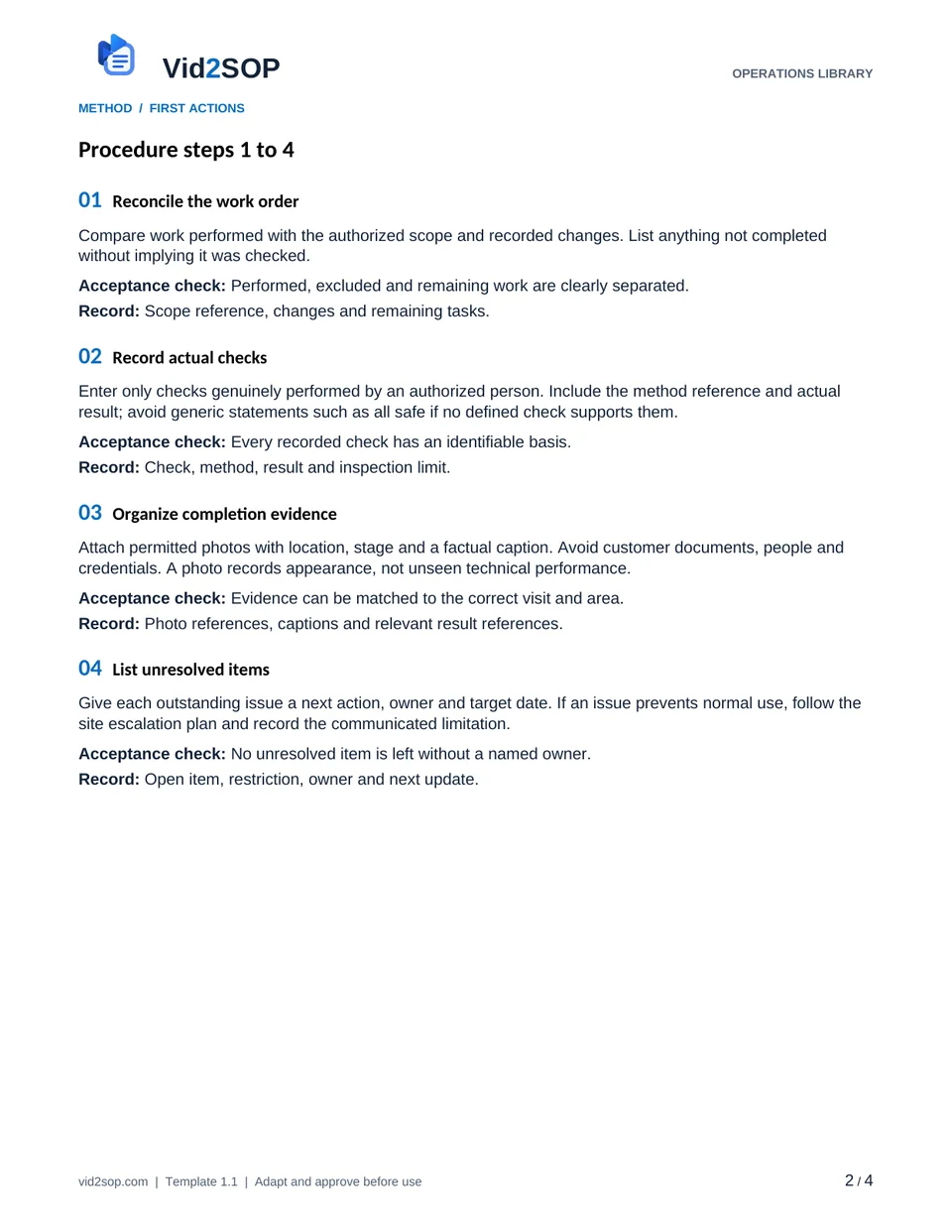
These previews show the actual template pages: document control and scope, followed by the detailed procedure. Download the Word file to adapt the content, or the PDF for a printable reference.
4 pages · Version 1.1 · Organization approval required
Select a page to open a larger preview.
Ready to adapt it for your team?
Editable Word or printable PDF. No email required.
Purpose and scope
Leave a usable account of a completed or partial visit and make the owner of each remaining action explicit.
Begins after authorized technical work stops and ends when the service coordinator receives the visit outcome. Covers documentation and handover; does not prescribe repairs, certify safe operation or replace contractual acceptance terms.
Service supervisor. Assign the actual owner, reviewer, approver and effective date before use. The library update date is not your approval date.
Who does what
- Technician: records work, results and limitations.
- Customer contact: acknowledges the visit or raises a question.
- Coordinator: reviews the record and owns scheduling of follow-up.
Tools and records
- Approved work order and scope changes
- Authorized test record where applicable
- Job report and secure evidence folder
Customize before the first use
- Define allowed completion statuses.
- Specify mandatory job records and photo permissions.
- Separate visit acknowledgment from acceptance of work and payment approval.
- Name who can close a job with open follow-up.
Use the Word file to edit the method, roles and fields. PDF is a printable reference, not an interactive form. Pilot the procedure with an authorized team member and resolve gaps before approving it.
The procedure
- 01
Reconcile the work order
Compare work performed with the authorized scope and recorded changes. List anything not completed without implying it was checked.
Acceptance check Performed, excluded and remaining work are clearly separated.
Record Scope reference, changes and remaining tasks.
- 02
Record actual checks
Enter only checks genuinely performed by an authorized person. Include the method reference and actual result; avoid generic statements such as all safe if no defined check supports them.
Acceptance check Every recorded check has an identifiable basis.
Record Check, method, result and inspection limit.
- 03
Organize completion evidence
Attach permitted photos with location, stage and a factual caption. Avoid customer documents, people and credentials. A photo records appearance, not unseen technical performance.
Acceptance check Evidence can be matched to the correct visit and area.
Record Photo references, captions and relevant result references.
- 04
List unresolved items
Give each outstanding issue a next action, owner and target date. If an issue prevents normal use, follow the site escalation plan and record the communicated limitation.
Acceptance check No unresolved item is left without a named owner.
Record Open item, restriction, owner and next update.
- 05
Review with the site contact
Explain what was done and what remains. Record the meaning of any acknowledgment, such as visit occurred or work reviewed; do not represent it as acceptance unless explicitly agreed.
Acceptance check The record accurately describes what the contact acknowledged.
Record Contact, acknowledgment meaning, time or reason unavailable.
- 06
Submit for coordinator review
Send the report and linked evidence through the approved channel. Use Complete, Partial or Follow-up required as appropriate.
Acceptance check Coordinator has the report, not just a completion message.
Record Submitted record, status and receiving coordinator.
- 07
Close or schedule the next action
Coordinator checks required fields and either closes within their authority or schedules follow-up. Keep the original visit record when later work is added.
Acceptance check Closure is authorized and follow-up has a traceable reference.
Record Reviewer, closure decision or follow-up reference.
When the standard route does not fit
Customer contact is unavailable
Record that acknowledgment was not obtained and route the report to the approved contact; do not fabricate a signature.
Evidence was not captured
Describe the gap and its impact; do not reuse photos from a different job.
Customer disputes completion
Keep the disputed item open and send the scope, reported issue and evidence to the supervisor.
Release checks
- No evidence from another job.
- Acknowledgment meaning is explicit.
- Partial work cannot become Complete merely because the technician left.
Record the outcome, unresolved actions, responsible owner and review date. Keep records in your approved system and apply your organization’s retention rules.
COMPANION WORKING RECORD
Use the Corrections log.
Keep open findings, correction owners and recheck evidence linked to the service visit.
Download Excel recordsExcel workbook · 3 tabs · Open the Corrections tab · No email required
Adapt the fields to your approved process. Decisions are recorded by your authorized person. This file does not automatically approve work or sync with Vid2SOP. Keep sensitive details in your controlled system.
ILLUSTRATIVE SCENARIO
What a useful record looks like
Example only: A scheduled visit completes two of three authorized tasks. A replacement part is unavailable. The report is Partial, lists the unfinished task, and assigns the coordinator to confirm delivery and a return date. The customer acknowledges the visit without accepting the unfinished work.
Record your actual method
- Show a staged work order comparison and a factual photo caption.
- Narrate how to report a partial visit.
- Demonstrate the difference between acknowledgment and approval using fictional names.
Obtain permission before recording. Remove customer information, access codes and personal details. Follow the current upload limits and access conditions shown in Vid2SOP. Review any resulting draft against what the video actually demonstrates.
Prepare a recording brief
Use the recording prompts above to plan your demonstration. With JavaScript enabled, you can also prepare a brief here.
Questions before you download
Can I edit this template?
Yes. The DOCX file can be edited in Word or imported into a compatible document editor. Check layout after editing. There is no direct template import into Vid2SOP in this release.
Is it approved for my country or industry?
No. It is a general operational drafting resource for adaptation. A responsible person must check local requirements, site conditions and the organization’s approved methods. No OSHA, COSHH, ISO or other certification is claimed.
Can my team use it commercially?
You may adapt and use it for your own organization’s internal operations, including paid service delivery. Do not resell or redistribute the unmodified library files as a competing template product.
Background references
These references provide context; they do not endorse or approve this template.
Put the procedure to work.
Download, adapt, pilot and approve the version your team will use.