SEE WHAT YOU WILL DOWNLOAD
A look inside the file.
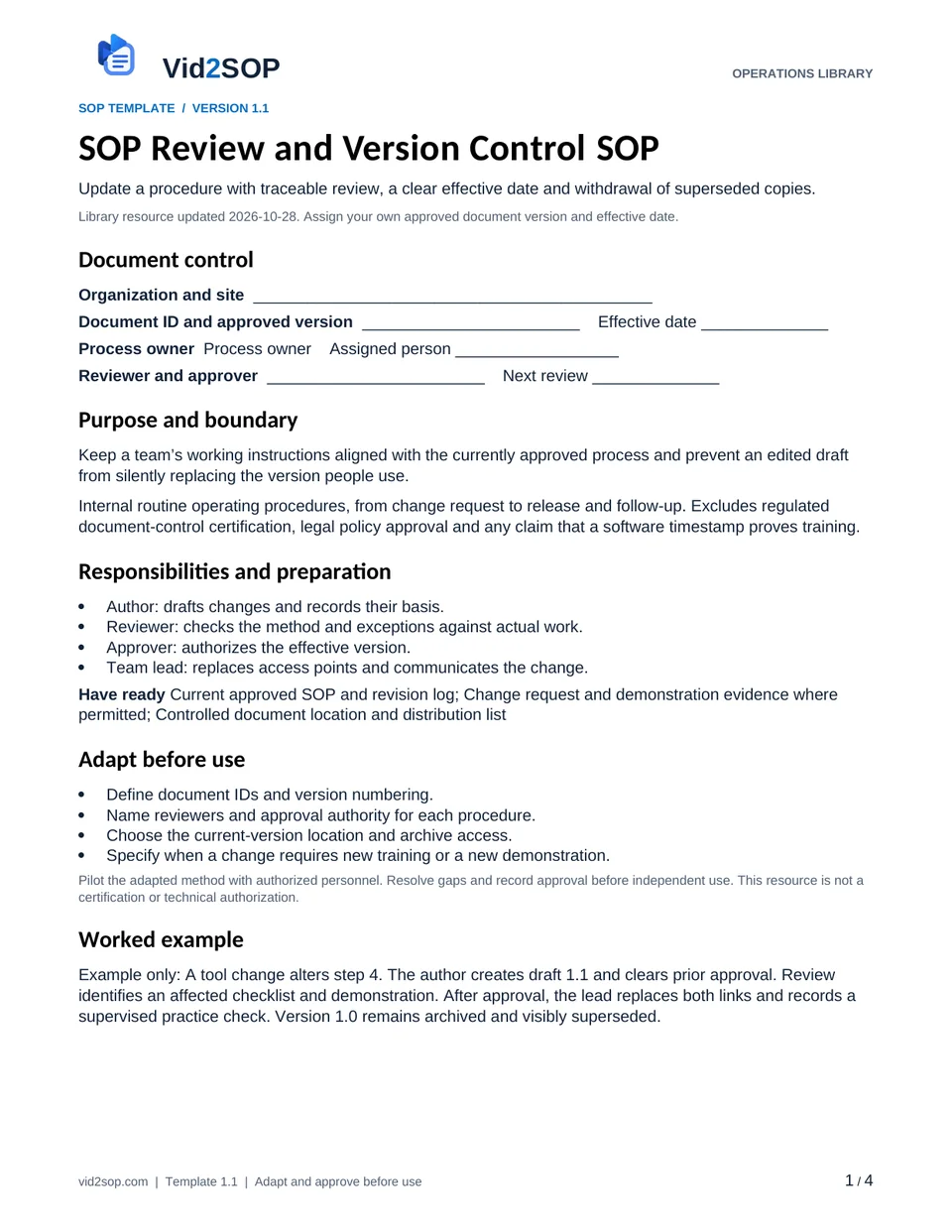
These previews show the actual template pages: document control and scope, followed by the detailed procedure. Download the Word file to adapt the content, or the PDF for a printable reference.
4 pages · Version 1.1 · Organization approval required
Select a page to open a larger preview.
Ready to adapt it for your team?
Editable Word or printable PDF. No email required.
Purpose and scope
Keep a team’s working instructions aligned with the currently approved process and prevent an edited draft from silently replacing the version people use.
Internal routine operating procedures, from change request to release and follow-up. Excludes regulated document-control certification, legal policy approval and any claim that a software timestamp proves training.
Process owner. Assign the actual owner, reviewer, approver and effective date before use. The library update date is not your approval date.
Who does what
- Author: drafts changes and records their basis.
- Reviewer: checks the method and exceptions against actual work.
- Approver: authorizes the effective version.
- Team lead: replaces access points and communicates the change.
Tools and records
- Current approved SOP and revision log
- Change request and demonstration evidence where permitted
- Controlled document location and distribution list
Customize before the first use
- Define document IDs and version numbering.
- Name reviewers and approval authority for each procedure.
- Choose the current-version location and archive access.
- Specify when a change requires new training or a new demonstration.
Use the Word file to edit the method, roles and fields. PDF is a printable reference, not an interactive form. Pilot the procedure with an authorized team member and resolve gaps before approving it.
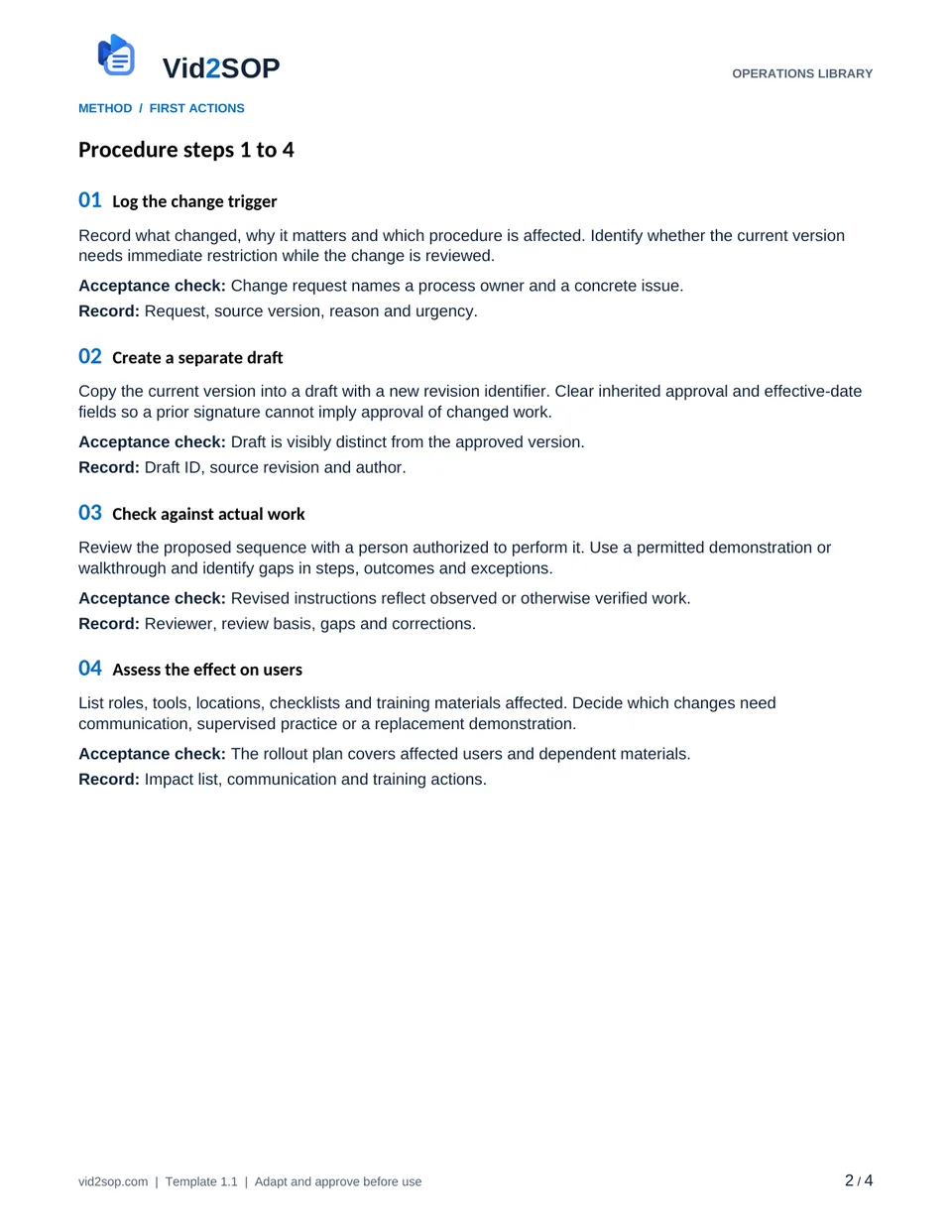
The procedure
- 01
Log the change trigger
Record what changed, why it matters and which procedure is affected. Identify whether the current version needs immediate restriction while the change is reviewed.
Acceptance check Change request names a process owner and a concrete issue.
Record Request, source version, reason and urgency.
- 02
Create a separate draft
Copy the current version into a draft with a new revision identifier. Clear inherited approval and effective-date fields so a prior signature cannot imply approval of changed work.
Acceptance check Draft is visibly distinct from the approved version.
Record Draft ID, source revision and author.
- 03
Check against actual work
Review the proposed sequence with a person authorized to perform it. Use a permitted demonstration or walkthrough and identify gaps in steps, outcomes and exceptions.
Acceptance check Revised instructions reflect observed or otherwise verified work.
Record Reviewer, review basis, gaps and corrections.
- 04
Assess the effect on users
List roles, tools, locations, checklists and training materials affected. Decide which changes need communication, supervised practice or a replacement demonstration.
Acceptance check The rollout plan covers affected users and dependent materials.
Record Impact list, communication and training actions.
- 05
Approve the effective version
The named approver reviews the draft and records approval or required revisions. Set an effective date only after approval. Never invent a reviewer identity.
Acceptance check Version, approver and effective date are traceable.
Record Approval record and effective version.
- 06
Replace access points
Publish the approved version to the current-version location. Withdraw or clearly mark superseded printed and digital copies, including outdated video links.
Acceptance check Normal team access resolves to the effective revision.
Record Distribution check, archived version and replacement record.
- 07
Confirm adoption and review
Record communication and any required practice separately. Check that a sample of actual use follows the new version and schedule the next review or trigger.
Acceptance check Receipt, training and observed use are not conflated.
Record Communication, practice result, use check and review trigger.
When the standard route does not fit
Reviewer finds the new sequence incomplete
Keep the draft out of normal use, assign the gap and repeat review before approval.
Old printed copies remain in use
Identify locations, replace copies and notify the team lead; record the correction.
An urgent temporary method is needed
Use the organization’s authorized temporary-change process with an owner and expiry; do not label an unapproved draft as permanent.
Release checks
- Drafts do not inherit prior approvals.
- The current-version link opens the intended effective revision.
- Training attendance is distinct from evidence of correct use.
Record the outcome, unresolved actions, responsible owner and review date. Keep records in your approved system and apply your organization’s retention rules.
COMPANION WORKING RECORD
Use the Version review log.
Track the proposed revision, review, approval, effective date and withdrawal of superseded copies.
Download Excel recordsExcel workbook · 3 tabs · Open the Version review tab · No email required
Adapt the fields to your approved process. Decisions are recorded by your authorized person. This file does not automatically approve work or sync with Vid2SOP. Keep sensitive details in your controlled system.
ILLUSTRATIVE SCENARIO
What a useful record looks like
Example only: A tool change alters step 4. The author creates draft 1.1 and clears prior approval. Review identifies an affected checklist and demonstration. After approval, the lead replaces both links and records a supervised practice check. Version 1.0 remains archived and visibly superseded.
Record your actual method
- Record a dummy revision request and compare old and proposed steps.
- Demonstrate how a reviewer checks the work against a permitted video.
- Show replacement of the current-version link without exposing private documents.
Obtain permission before recording. Remove customer information, access codes and personal details. Follow the current upload limits and access conditions shown in Vid2SOP. Review any resulting draft against what the video actually demonstrates.
Prepare a recording brief
Use the recording prompts above to plan your demonstration. With JavaScript enabled, you can also prepare a brief here.
Questions before you download
Can I edit this template?
Yes. The DOCX file can be edited in Word or imported into a compatible document editor. Check layout after editing. There is no direct template import into Vid2SOP in this release.
Is it approved for my country or industry?
No. It is a general operational drafting resource for adaptation. A responsible person must check local requirements, site conditions and the organization’s approved methods. No OSHA, COSHH, ISO or other certification is claimed.
Can my team use it commercially?
You may adapt and use it for your own organization’s internal operations, including paid service delivery. Do not resell or redistribute the unmodified library files as a competing template product.
Background references
These references provide context; they do not endorse or approve this template.
Put the procedure to work.
Download, adapt, pilot and approve the version your team will use.