Between checkout and the next check-in, a cleaner needs a clear order of work, property-specific standards, and a way to flag anything that could delay guest readiness. A reusable Airbnb turnover cleaning checklist helps hosts, co-hosts, and cleaners follow the same reviewed process across stays.
Use the free Airbnb turnover checklist template online or download the editable CSV. Below you will find a completed illustrative example and a short method for adapting the checklist to one property. It is a planning aid, not an Airbnb-issued policy or a substitute for property instructions and local requirements.
Use the guide as a starting point, then replace every generic line with the host-approved standard for that rental.
Free Airbnb Turnover Checklist Template
Open the printable Airbnb turnover checklist template to print a copy or save a PDF. To edit the checklist digitally, download the editable CSV file for Excel, Google Sheets, or another spreadsheet app. The template includes property-specific acceptance checks, status and owner fields, exception notes, and a final release review.
Start by filling in the property's accepted standard and the scope for each stay. Use Complete, Flagged, Blocked, or N/A consistently. A blank or blocked critical item is not a pass. Add a short note or approved photo reference when a task needs follow-up. Do not put door codes, guest names, or other sensitive details in a broadly shared copy.
Completed Example: One Turnover
The example below is fictional and illustrates how to record a routine check and an unresolved issue. It is not a customer result or a guarantee.
| Area / task | Property-specific acceptance check | Status / owner | Exception / photo reference |
|---|---|---|---|
| Entry and access | Confirm entry and lock settings against the host's current instructions | Complete · Cleaner A | Access confirmed; no code copied into the checklist |
| Bedroom reset | Fresh approved linen set; bed matches the property's reference arrangement | Complete · Cleaner A | None |
| Bathroom | Fixtures and mirror meet the host's visible-clean standard; fresh towels in the specified location | Complete · Cleaner A | None |
| Kitchen | Remove prior guest food according to the host's policy; wipe listed surfaces; reset supplied items | Complete · Cleaner A | One low coffee supply recorded for restocking |
| Final walkthrough | Check lights, thermostat, windows, and lock against the property's departure instructions | Flagged · Cleaner A | Thermostat display blank; host notified; release remains pending until resolved |
The last row matters: a completed cleaning checklist does not mean the property is ready when an unresolved issue affects access or guest use. Record who owns the follow-up, the deadline, and who confirms the recheck before changing the release status.
What Is an Airbnb Turnover Cleaning Checklist?
An Airbnb turnover cleaning checklist is a room-by-room list of tasks that must be completed between guest stays.
It usually includes:
- Cleaning tasks
- Linen and towel reset
- Restocking supplies
- Damage checks
- Guest-ready presentation
- Final photos or proof of completion
The best turnover checklists are simple enough to use during a busy cleaning window but detailed enough to protect your reviews.
Why Turnover Cleaning Needs a Standard Process
Short-term rentals depend on consistency. One missed trash bin, one hair in the bathroom, one empty soap dispenser, or one stained towel can turn into a bad review.
A turnover checklist helps you:
- Reduce missed steps
- Prepare the property faster
- Train new cleaners
- Keep guest experience consistent
- Confirm restocking tasks
- Document damage before the next guest arrives
- Create proof if a dispute happens
If the same turnover process is repeated every week, it should be documented as a checklist and a SOP.
Airbnb Turnover Cleaning Checklist by Area
Use this room-by-room structure as a starting point.
1. Entry and General Areas
- Check the door, lock, keypad, or key box.
- Remove trash and guest items.
- Dust visible surfaces.
- Vacuum or sweep floors.
- Mop hard floors if needed.
- Check lights and replace bulbs if required.
- Make sure Wi-Fi instructions or guest guide are in place.
- Check for damage or unusual conditions.
2. Living Room
- Reset furniture and pillows.
- Wipe tables and visible surfaces.
- Check under cushions.
- Remove crumbs, hair, and dust.
- Clean glass surfaces.
- Check remote controls.
- Confirm decor is arranged correctly.
- Vacuum or mop the floor.
3. Kitchen
- Empty trash and replace liner.
- Clean sink and faucet.
- Wipe countertops.
- Clean stovetop.
- Check microwave, oven, and refrigerator.
- Remove expired or leftover food according to your policy.
- Wash or replace used dishes.
- Restock coffee, tea, paper towels, dish soap, and sponge if provided.
- Check drawers and cabinets for guest items.
- Clean floor.
4. Bedroom
- Remove used linens.
- Check mattress protector.
- Make the bed with fresh sheets.
- Place pillows correctly.
- Fold or arrange towels according to the property standard.
- Dust nightstands and visible surfaces.
- Check closets and drawers.
- Remove guest items.
- Vacuum or mop floor.
- Confirm the room looks photo-ready.
5. Bathroom
- Remove used towels.
- Clean toilet, sink, mirror, shower, and tub.
- Disinfect high-touch surfaces.
- Remove hair from drain areas.
- Refill soap, shampoo, conditioner, toilet paper, and tissues if provided.
- Replace towels.
- Empty trash.
- Check for leaks or damage.
- Mop floor.
6. Laundry and Linens
- Separate stained items.
- Start laundry if done on-site.
- Count towels and linens.
- Replace damaged or heavily stained items.
- Store clean linens neatly.
- Report low inventory.
7. Restocking Supplies
Create a standard restocking list for every property.
Common items:
- Toilet paper
- Paper towels
- Hand soap
- Dish soap
- Trash bags
- Coffee or tea
- Laundry detergent
- Shampoo and conditioner
- Cleaning supplies
- Batteries for remotes or locks
Restocking is one of the easiest tasks to miss when cleaners are rushed.
8. Damage and Maintenance Check
Turnover cleaning is the best time to catch issues early.
Check:
- Broken furniture
- Stained linens
- Missing items
- Wall marks
- Water leaks
- Damaged appliances
- Smoke or odor issues
- Lock or keypad problems
Document anything unusual before the next guest arrives.
9. Final Guest-Ready Review
For task ownership and room release, use the housekeeping checklist. Record failures and rechecks with the cleaning inspection scorecard; a high completion score does not override an unresolved issue that prevents guest arrival.
Before leaving, do one final walkthrough.
Confirm:
- Beds are made.
- Towels are placed correctly.
- Floors are clean.
- Trash is removed.
- Supplies are restocked.
- Bathroom is spotless.
- Kitchen is clean.
- Lights, thermostat, and locks are set correctly.
- The property looks ready for guest arrival.
This final review is what protects the guest experience.
Checklist vs. SOP for Airbnb Turnovers
A checklist is useful during the cleaning window. It records what must be completed and any exceptions. A standard operating procedure (SOP) explains how to perform each task, the property-specific quality standard, and what to do when something is blocked or out of scope. Use this cleaning SOP template guide to structure the written steps, then use the cleaning staff training checklist to plan a reviewed handoff. For quality checks, see the cleaning inspection scorecard.
For Airbnb turnover cleaning, use both:
- Checklist: fast field use
- SOP: training and standardization
- Photos: proof of completion
Airbnb Guidance and Template Scope
Airbnb's host ground rules say a listing should be clean and free of health hazards before check-in, and that hosts should clean between stays. Use the current Airbnb ground rules for home hosts and its host cleaning strategy and checklist as reference points. This editable template is an operational aid; it is not an Airbnb-issued checklist, certification, or guarantee of compliance. Follow current host instructions and applicable local requirements.
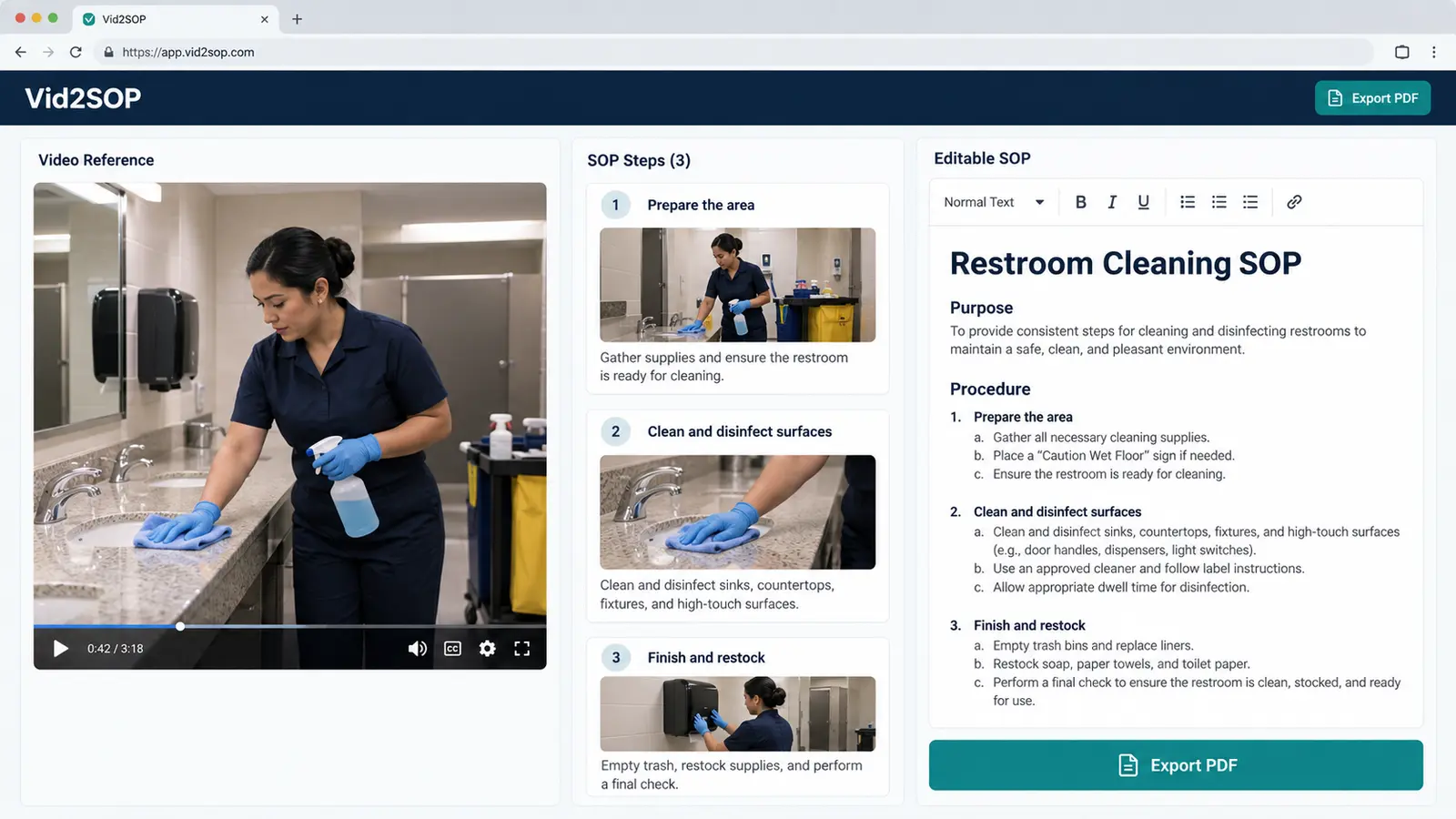
Turn Your Walkthrough Video Into a Visual SOP Draft
Record a walkthrough of your own approved turnover process, then use Vid2SOP to capture useful frames from the video. In the current version, you write and review each instruction yourself, edit the visual draft, and export a visual SOP PDF. Vid2SOP does not transcribe speech or automatically write the cleaning procedure, verify that a room is clean, or manage bookings and cleaner assignments. Review every step against the host’s current instructions before sharing it with a cleaner.
Final Thoughts
Airbnb turnover cleaning is a repeatable process. If you document it well, you can reduce stress, improve quality, and protect your reviews.
Start with one property. Create a checklist, test it during a real turnover, improve it, and then turn the process into a SOP your cleaner can follow every time.
Download the Vacation Rental Turnover Release SOP in PDF or Word →
Put your process into practice
Capture useful frames from a turnover video, write and review your own instructions, and export a visual SOP PDF with Vid2SOP.
Create a visual SOP draft with Vid2SOP. The current version leaves the wording and review of each step in your hands.
Create your SOP